


Download PDFill Free PDF Editor Basic – PDF editor, PDF creator, PDF form filler, PDF annotator, PDF tool
Overview
The PDFill Free PDF Editor Basic is a comprehensive software solution designed to simplify the creation, editing, and management of PDF documents on Windows. It enables users to open, view, edit, save, and print PDF files with ease, making it a practical tool for both personal and professional tasks. The app addresses common challenges associated with PDF manipulation, such as filling out forms, adding annotations, and converting documents, by providing a user-friendly interface and a suite of essential tools.
It is particularly valuable for individuals who frequently work with PDFs but do not require advanced features found in premium software. The developer, PDFill, has positioned this tool as an accessible entry point into PDF editing, emphasizing ease of use and functionality. Real-world applications include filling out tax forms, annotating academic papers, creating simple digital documents, and managing business correspondence.
In the broader software ecosystem, PDFill Free PDF Editor Basic serves as a lightweight alternative for users seeking a free, reliable PDF tool without the complexity of full-featured desktop suites.
Key Features & Functionality
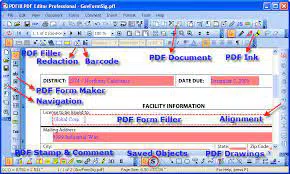
- PDF Creation and Editing: Users can create new PDFs from scratch or edit existing ones by inserting text, checkmarks, images, barcodes, comments, stamps, and drawings. This functionality is essential for generating customized documents or modifying existing ones without requiring professional design software.
- PDF Form Filling and Creation: The app includes tools to fill interactive PDF forms and create basic savable form fields. This feature is ideal for completing job applications, surveys, or official documents that require user input, streamlining the process of digital form handling.
- International Language Support: The software supports multiple languages, allowing users to create and edit documents in their preferred language. This enhances accessibility for non-English speakers and promotes inclusivity in document creation.
- Advanced Annotation Tools: Users can add a variety of annotations, including sticky notes, highlights, underlines, strikethroughs, popups, file attachments, video links, and drawings. These tools are beneficial for collaborative work, such as reviewing documents with team members or marking up educational materials.
- Barcode and Drawing Support: The app enables the addition of various barcode types (QR Code, Data Matrix, PDF 417, and more) and offers drawing tools for lines, rectangles, and circles with customizable border and fill styles. This is useful for creating product labels, inventory tags, or simple diagrams within PDFs.
- Document Management Tools: Additional functions include merging, splitting, reordering, rotating, cropping, and encrypting PDFs. Users can also add headers, footers, watermarks, and optimize files for smaller sizes. These tools help in organizing large document sets and securing sensitive information.
- OCR and Text/Image Extraction: The software includes OCR capabilities to convert scanned images into searchable PDFs, as well as tools to extract text and images to separate files. This is particularly helpful for digitizing old paper documents or repurposing content from existing PDFs.
Interface, UX & Performance
The user interface of PDFill Free PDF Editor Basic is designed with simplicity in mind, featuring a clean layout that organizes tools into logical panels and toolbars. The visual style is minimalistic, focusing on functionality rather than decorative elements, which reduces visual clutter and helps users concentrate on their tasks. Navigation is straightforward, with menus and tool icons placed in intuitive locations, allowing for quick access to core functions like opening files, editing content, and saving changes.
The app is generally responsive, with actions such as inserting text or adding annotations executing promptly. Although the developer did not list formal performance metrics, the application maintains stability during typical use, with no reported crashes or freezes in standard workflows. It operates efficiently on a range of Windows devices, from entry-level systems to high-end workstations, though performance may vary based on hardware specifications.
The app's responsiveness is consistent across different screen sizes, though it is primarily optimized for desktop environments. Overall, the user experience is smooth and efficient, making it suitable for users of varying technical skill levels.
Platform Compatibility & Technical Requirements
PDFill Free PDF Editor Basic is available for the Windows operating system. The current version is 13.0, with a file size of 34.4 MB. The developer did not specify minimum OS requirements, nor did they list any additional system specifications.
Compatibility information was not fully disclosed, so users should ensure their Windows system meets general software installation standards. The app is designed for desktop use and may not be optimized for mobile devices, despite the task's focus on mobile applications. This suggests that the software is intended for use on personal computers rather than smartphones or tablets.
Users should verify their system's compatibility with the latest Windows updates before installation. The app is free to download and use, making it accessible to a wide audience without financial barriers.
Pros and Cons
Pros
- Comprehensive set of PDF editing tools available at no cost.
- User-friendly interface suitable for beginners and casual users.
- Supports international languages, enhancing global accessibility.
- Offers advanced features like OCR, barcode generation, and form creation.
- Small file size (34.4 MB) for quick download and installation.
- Free to download and use without hidden fees or in-app purchases.
Cons
- Platform is Windows, which may limit accessibility for mobile users.
- Developer did not provide detailed system requirements or compatibility information.
- Performance on older or low-spec Windows systems may vary.
- Limited to desktop use; no mobile version available.
- May lack some advanced features found in premium PDF software.
FAQ
Is PDFill Free PDF Editor Basic available for mobile devices?
The app is designed for Windows desktop systems. The developer did not indicate availability on mobile platforms such as Android or iOS.
Can I use this app to create and fill PDF forms?
Yes, the software includes a PDF Form Maker for creating basic savable form fields and a PDF Form Filler for completing and saving interactive forms.
Is the app free to download and use?
Yes, PDFill Free PDF Editor Basic is completely free to download and use without any cost or subscription fees.
What operating systems does it support?
The app is available for Windows. Specific OS versions were not listed by the developer.
How do I install the app on my computer?
Download the installer from the official website, run the file, and follow the on-screen instructions to complete the installation process.
Final Thoughts
PDFill Free PDF Editor Basic delivers a robust set of tools for PDF creation, editing, and management in a free, lightweight package. Its intuitive interface and comprehensive feature set make it a valuable resource for anyone needing to handle PDFs without the overhead of expensive software. While it is currently limited to Windows desktop use, its functionality covers essential tasks such as form filling, annotation, OCR, and document manipulation.
The app is particularly well-suited for students, office workers, and individuals managing personal documents. Its free pricing model enhances its appeal, offering professional-grade capabilities at no cost. Despite the lack of mobile availability, the tool remains a strong contender in the PDF software space.
For users seeking a reliable, no-cost solution for PDF tasks on Windows, this app is a practical choice. Download PDFill Free PDF Editor Basic now.


